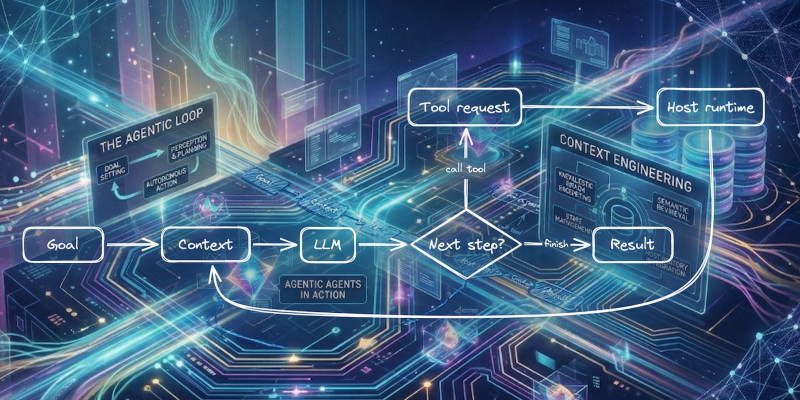
The word agent is now being used for too many different things.
The term now covers everything from fixed workflows with a single LLM step to tool-using chatbots, browser-driving systems like OpenAI’s Computer-Using Agent, and open agent stacks like OpenClaw, NanoClaw, and NemoClaw. If the category feels muddy, this is why.
This post is for developers who see the term everywhere and want a version they can implement in under 50 lines. The goal is not to settle a philosophy question. The goal is to make the idea concrete.
Most useful agentic systems reduce to context, tools, a host loop, and a runtime.
If that sounds smaller than the marketing, good. Smaller is easier to reason about.
Who owns the control flow?
That earlier definition gives us a simple starting point. The first useful question is who owns the control flow.
By control flow, I mean who gets to decide the next step.
In a workflow, the developer owns the control flow. In an agentic system, the model gets to choose at least some next steps inside a bounded runtime.
A simple comparison makes this concrete. The difference shows up in who drives the loop, which tools are available, and how the runtime constrains the system.
A workflow:
- fetch document
- summarize document
- classify summary
- send result
An agentic loop:
- ask the model to choose among
search,read,retry,finish - execute the allowed action
- feed the result back
- repeat until
finishor a runtime limit stops the loop
The important difference is not whether an LLM appears somewhere in the diagram. It is who gets to decide the next step.
That is why not every LLM application is an agent. Many useful systems are better described as workflows, and in production that is often the better choice.
The smallest useful architecture
By itself, an LLM is not an agent. It predicts the next piece of text (a token) from the input it has been given (its context).
It becomes agentic when you wrap four things around it:
- context: the task, rules, examples, recent history, and local state the model gets to see
- tools: structured ways to ask the outside world to do deterministic work, such as reading data, running a query, or fetching a page
- a host loop: control flow that asks the model for the next step, executes allowed tool calls, feeds results back, and decides when to stop
- a runtime: the system that enforces limits such as paths, timeouts, retries, network access, and confirmation gates
That gives you the smallest useful architecture:
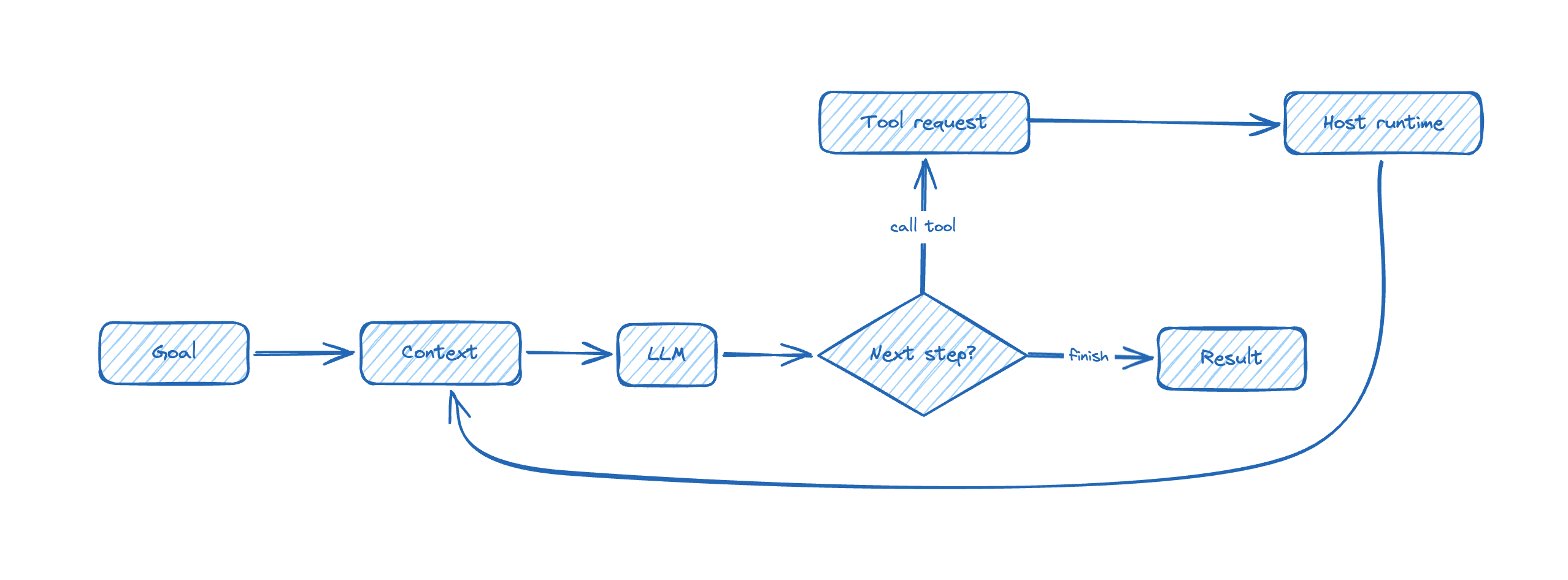
The short version is even simpler:
- the model proposes
- the host executes
- the runtime limits what can happen
A minimal setup for running the examples
The examples in this post move in three steps: two tiny model probes that are useful but not agentic, and one tiny local agent loop that shows the agent shape directly.
I created a dedicated GitHub repository for this series, but since the scripts are short, you will also find them included in this article.
Also my intention is that the examples in this series are staying close to one-command runnable. For these examples, I use Astral uv as the Python package and execution tool, and PEP 723 to declare script metadata inline.
Install uv once. On macOS and Linux:
| |
For Windows, use the official installation instructions. With PEP 723, a Python file can carry its own inline metadata:
| |
If the file needs third-party packages, the same block can also declare dependencies = [...], so uv run script.py can build the environment and run the file in one step.
Learning agents also does not require paying to get started. For this article, two routes are enough:
- default route: OpenRouter free models, especially
openrouter/free - alternative route: Gemini API via Google AI Studio
Remarks:
- OpenRouter’s pricing page says, as of March 28, 2026, that free users get 50 requests per day at 20 RPM, while pay-as-you-go accounts with at least 10 USD in credits get 1000 daily requests on free models at the same 20 RPM. Their docs also note that failed attempts still count.
- Google’s Gemini pricing page currently shows free-of-charge rows for preview models such as
gemini-3-flash-previewandgemini-3.1-flash-lite-preview, while warning that preview models may change before becoming stable and may have different rate limits.
These are enough for this post: the goal is cheap experimentation, not production guarantees.
Baseline: one model call that is not an agent
Start with the plain request-response case. It is useful, but it is not agentic.
If you want the commands exactly as written, call this file free_probe.py:
| |
To run it, export your OpenRouter API key as an environment variable, then run the script with uv.
| |
That is the boring baseline, and it is useful to see it plainly:
- there is no tool use
- there is no loop
- the model does not choose the next step
- the host makes one request and gets one answer
If you prefer Gemini, the same shape works there too. The endpoint, auth, and model name change. The architectural lesson does not.
A tiny notes agent
If you want the commands exactly as written, call this file notes_agent.py:
| |
Run it:
| |
This is still a teaching example, not a general agent.
That is deliberate. The first tool call does not answer the question, so the planner has to search, inspect the result, read one note, and then read another before it can finish.
TOOLSdefines what the system is allowed to do. If an action is not in that dictionary, it cannot happen.traceis the running state. In this teaching example, the planner uses it to see what has already been read and what still needs to happen.planner(...)chooses the next action. In this teaching example it is deterministic. In a real agent, this is the part that becomes an LLM call returning structured output.run_agent(...)is still in charge. The host asks for the next action, validates it, executes it, records the result, and decides when the run ends.max_stepsis already runtime policy. It is small and boring, which is exactly why it matters.
When people say “an LLM is an agent,” the useful engineering interpretation is narrower than that. The model is being used as the planner inside a larger mechanism.
If you replace planner(...) with a real LLM call, the shape stays the same. What changes is the source of uncertainty:
- next-step choice becomes probabilistic
- tool selection becomes a matter of model judgment
- tool outputs have to be fed back into context
- stopping rules matter more
- noisy traces start to degrade later decisions
Swapping in an LLM changes the planner, not the surrounding machinery.
The same loop can become dangerous very quickly
The teaching example above is harmless because the tool surface is tiny, the loop is bounded, and nothing touches the filesystem or the network.
Now replace read_note(name) with delete_file(path) and remove path restrictions.
The planner did not become smarter. The loop did not become more advanced. What changed is the blast radius. The runtime is now less restrictive.
That is why the practical questions are not mystical ones. They are plain engineering questions:
- which tools exist?
- which arguments are allowed?
- which paths are writable?
- which actions need confirmation?
- what stops the loop?
The exact same planner can be safe, annoying, or dangerous depending on those answers.
What breaks first in practice
Once the basic shape is visible, three caveats matter immediately.
1. Reliability fails before the demo stops looking impressive
The first successful run creates false confidence.
A small agent loop often works once or twice before it shows what is missing:
- tool descriptions were ambiguous
- tool outputs were too noisy
- the trace kept the wrong details
- the stopping rule was too weak
- the model kept retrying a bad idea
These are engineering problems. That is good news. They can be studied and improved, but they do not disappear just because the first demo looked smooth.
2. Permissions define the blast radius
As soon as the runtime can touch shell commands, files, browsers, inboxes, or APIs, the question changes.
It is no longer “is the prompt good?”
It is “what is this system allowed to damage?”
That is one reason the current open stacks are worth studying. For example, NVIDIA’s NemoClaw page explicitly positions it as OpenClaw with added security and privacy controls. Systems like OpenClaw, NanoClaw, and NemoClaw are interesting not because they finally discovered magic, but because they make context assembly, tool surfaces, and runtime policy impossible to ignore.
3. Free tiers are excellent for learning and bad as a promise
Free access is enough to study the mechanics. It is not a stable production contract.
Provider pages such as OpenRouter pricing and Gemini pricing tell the same story in slightly different language: quotas, previews, and temporary unavailability are part of the deal.
That is fine. You can still learn a great deal without paying. Just do not confuse “free enough to experiment” with “stable enough to promise.”
What this article does not cover
These limits are deliberate. This article does not try to cover memory, Model Context Protocol, browser control, multi-agent delegation, long-running jobs, or evals.
The goal of this post is narrower:
- tell workflows and agentic loops apart
- name the smallest useful architecture
- make the structure visible in one small file
- show why runtime policy matters immediately
In the next post in this series, I will narrow the focus further and turn to the most underrated part of the whole stack: context engineering.
Just as a teaser in the next article “Context engineering is the core job” I will cover topics as:
- why context is larger than the prompt
- why bigger context is not automatically better context
- the difference between context and memory
- how context assembly changes model behavior