Motivation
Recently I wrote about orchestrating parallel subagents for data collection, exploration, and reporting — a hands-on case study using Codex subagents to coordinate data collection, preparation, and Slidev report generation in parallel.
It was an interesting experience to watch how subagents were spawned by a main agent, executed work in parallel, and returned results back to their parent. In that setup, each subagent was running in complete isolation.
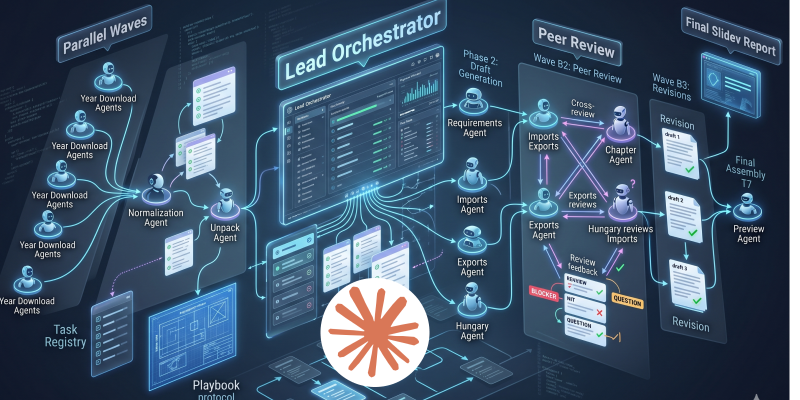
In general, I tend to prefer teamwork over isolated, siloed execution. So I started wondering: what happens if agents can actually collaborate? For example, what if they review each other’s report sections before everything gets merged into a final output?
With that in mind, I enabled agent teams in Claude and set up a small team to handle the same data collection, exploration, and reporting workflow.
You can find the full setup here, download it, and reproduce the process yourself: https://github.com/ipeterfulop/claude-code-agent-teams-showcase
What to include in your instruction file to set up
If you want to try something similar, the key is not the prompt itself, but how you structure the instruction file that defines the team.
I didn’t need a complex setup to get something useful running — but a bit of structure around roles, tasks, and communication made a big difference.
1. Team structure
Define who is in the team and what they are responsible for.
In my setup, this was enough:
- a coordinator (orchestrates the flow)
- a few specialists (data collector, analyst, report writer, reviewer)
Each agent had:
- a clear role
- a clear scope (what they own)
- a short note on how they interact with others
I noticed pretty quickly that once roles started to overlap, things became harder to reason about — agents would either duplicate work or skip steps.
2. Task registry
Instead of one big instruction, I broke the work into named tasks.
Something like:
collect_dataprepare_dataanalyze_section_Xgenerate_report_sectionreview_section
Each task defines:
- inputs
- expected output
- owning agent
I initially tried keeping this implicit, but agents started stepping on each other’s work. Making tasks explicit made handoffs much more predictable.
3. Communication rules
This is where things started to feel more like a team and less like parallel scripts.
I added a few simple rules:
- analysts send results to a reviewer before finalization
- the report writer only works with reviewed sections
For example, without the review step, the final report became inconsistent pretty quickly — different sections had different levels of detail and structure.
Nothing fancy here, but even minimal rules changed the behavior a lot.
4. Execution flow (lightweight)
I didn’t define a strict workflow, just a rough order:
- data collection
- preparation
- parallel analysis
- review
- report assembly
The coordinator uses this as guidance rather than a rigid script.
Trying to over-specify this made things worse in my experiments — the setup became brittle instead of flexible.
5. Output contracts
This is easy to skip, but it helped more than I expected.
I defined:
- basic structure for outputs
- clearly labeled sections
- consistent formatting
Without this, downstream agents spent time guessing how to interpret results instead of actually using them.
Closing
That was enough to get something useful running.
This setup is not the right answer for every task. For help deciding when to use isolated subagents and when collaboration is worth the coordination cost, see When to use subagents and when to use agent teams.
It’s a small setup, but it was enough for me to start seeing how agent teams behave differently compared to isolated subagents — less like independent tools, and a bit more like collaborators.
If you want a concrete example, the full instruction file is here:
https://github.com/ipeterfulop/claude-code-agent-teams-showcase