
Risk assessment workflow
The diagram below shows the workflow I used to turn Snowflake’s bundle notes into a structured risk assessment.
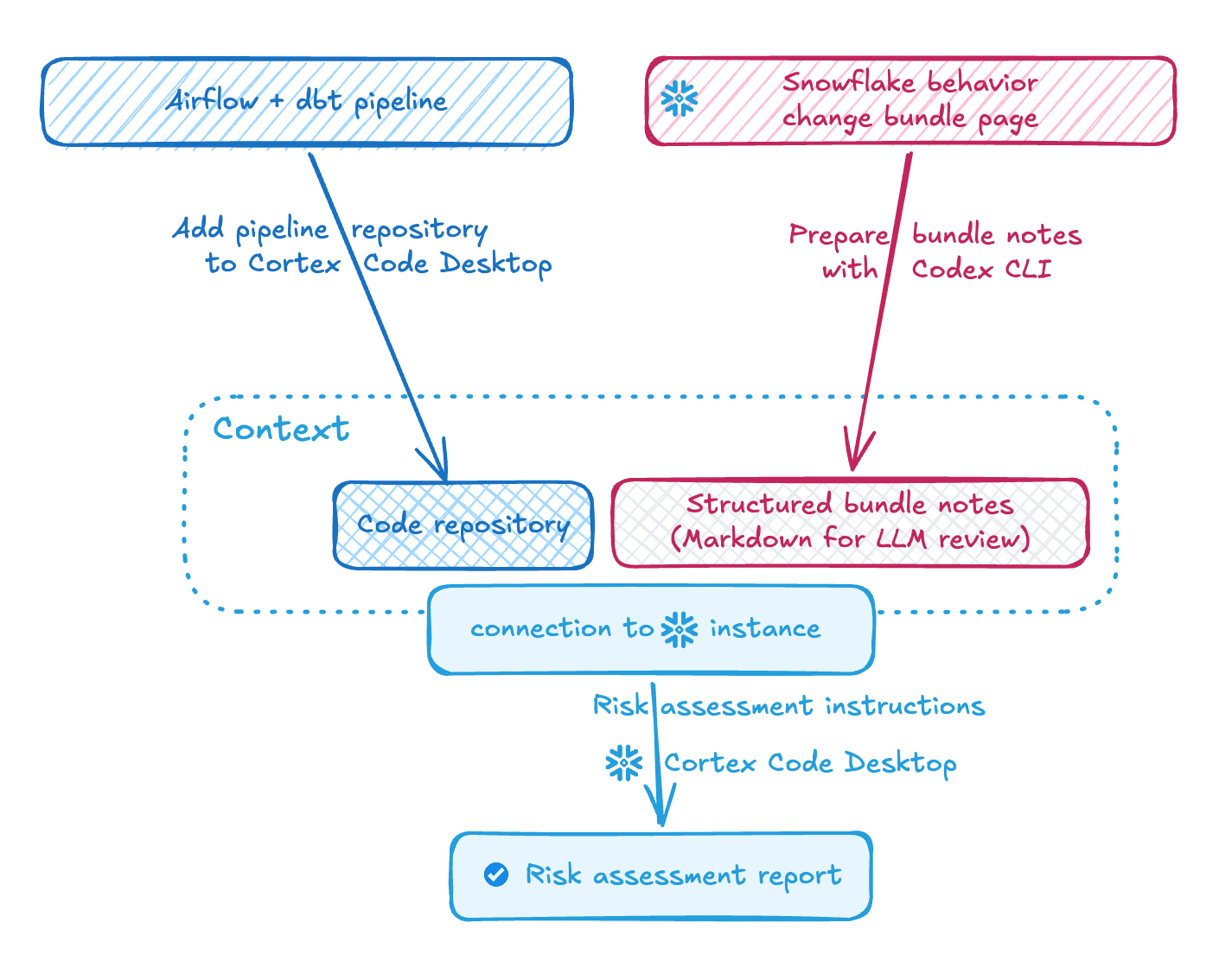
I split the work between cheaper context preparation in Codex CLI, repository-aware analysis in Cortex Code Desktop, and human review at the end.
That boundary mattered because our pipeline is a complex system: the agent was useful for narrowing the search space and surfacing likely impact areas, but deciding which code changes were actually safe still required engineering judgment.
Snowflake behavior change bundles
Snowflake does not usually introduce breaking or semantic changes without warning. Instead, it groups them into behavior change bundles. Each bundle has a name based on the year and month, such as 2026_04 or 2025_07, and the changes inside it are grouped by functional area. That makes it easier to review what is changing and decide what might affect your account. Changes that are not tied to a bundle are tracked separately as unbundled behavior changes.
Each bundle moves through three phases, usually over the course of a few months.
Disabled by Default: administrators can enable the bundle early withSYSTEM$ENABLE_BEHAVIOR_CHANGE_BUNDLEand test the changes before they are rolled out more broadly.Enabled by Default: the new behavior is turned on automatically for all accounts, but administrators can still disable it withSYSTEM$DISABLE_BEHAVIOR_CHANGE_BUNDLEif they hit a problem.Generally Enabled: the rollout is complete, the changes become permanent, and the bundle can no longer be enabled or disabled.
Snowflake notes that bundle timelines are subject to change, so the published schedule is best treated as a planning aid rather than a guarantee.
The team’s earlier approach (before using an agent for bundle risk assessment)
Before we started using an agent for Snowflake behavior bundle assessments, the process was manual. We would read through the upcoming changes, run exploratory queries in Snowflake, and inspect the pipeline code for features that might be affected.
Using an agent did not replace the review, but it likely saved us around 4-5 engineering hours on gathering context and checking the more obvious impact areas.
Preparing the context
Cortex Code Desktop is useful, but I did not want to spend the more expensive model budget on work that could be prepared in advance.
So I first used the Codex CLI with GPT-5.4 on medium reasoning to parse the DOM of the latest 2026_04 behavior bundle page, follow each listed change one level deeper, collect the details, and organize them into a Markdown file. That gave me a cleaner input for the later risk assessment step.
Adding access to the code repository
Some bundle changes can be assessed directly from the Snowflake account by checking settings, metadata, or query history.
Others need code inspection. SQL syntax or command changes, such as the JOIN ... USING change in the current bundle, only become clear once you look at the dbt models, macros, and transformation logic that could be affected.
That is why we added the repository to the risk assessment project in Cortex Code Desktop. The goal was not to let the agent make broad guesses about the codebase, but to let it inspect the relevant files and point to specific places that might need attention before the 2026_04 bundle becomes the default.
Even with that help, we considered human review essential before changing pipeline code. Our pipeline is a complex system with many dependencies, so suggested changes still needed engineering judgment and manual validation.
Running the risk assessment creation in Cortex Code Desktop
Choosing the harness
I generally prefer CLI tools. I only switch to a visual editor when it gives me a faster way to compare several related things at once.
For this workflow, Snowflake Cortex Code Desktop was useful because it let me keep the repository, the bundle notes, and the running investigation in one place. That mattered more to me than the IDE aspect itself.
Process details
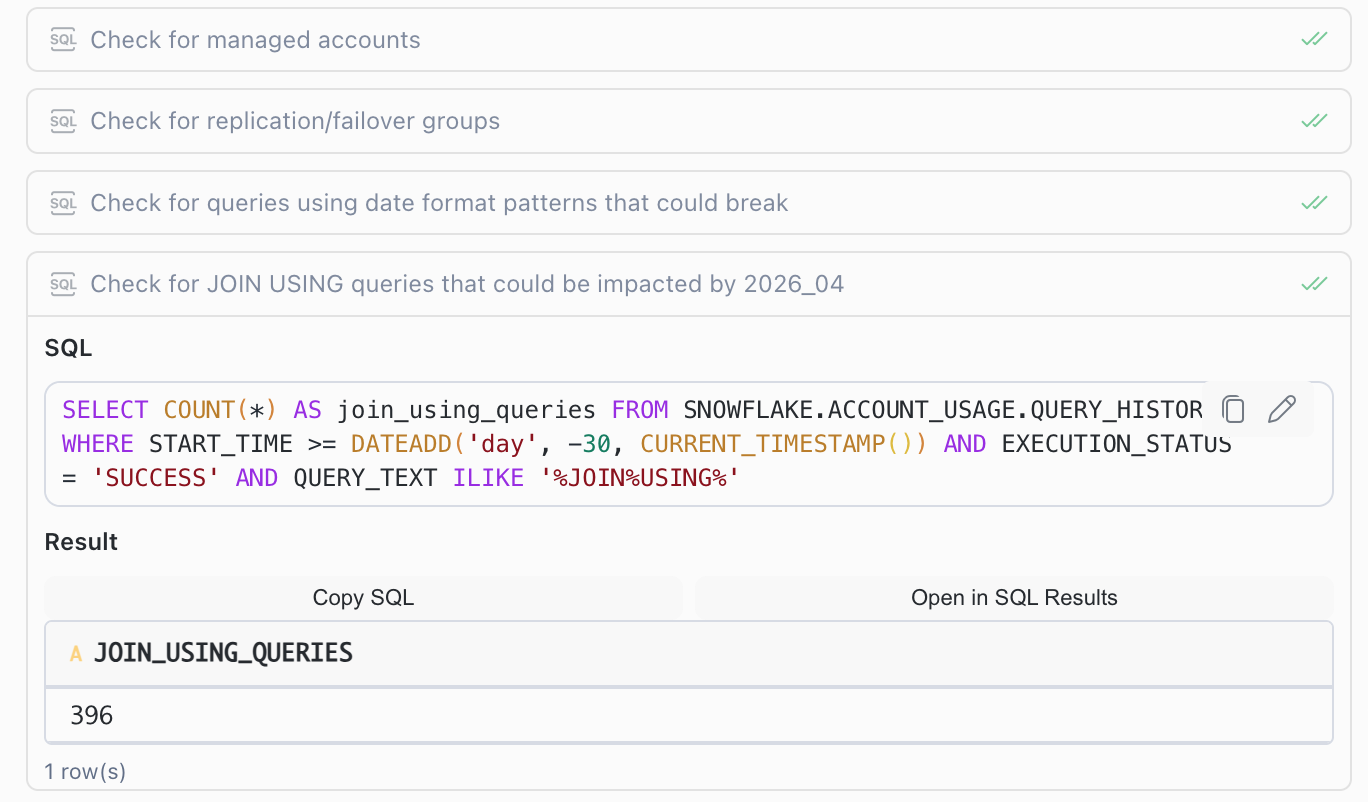
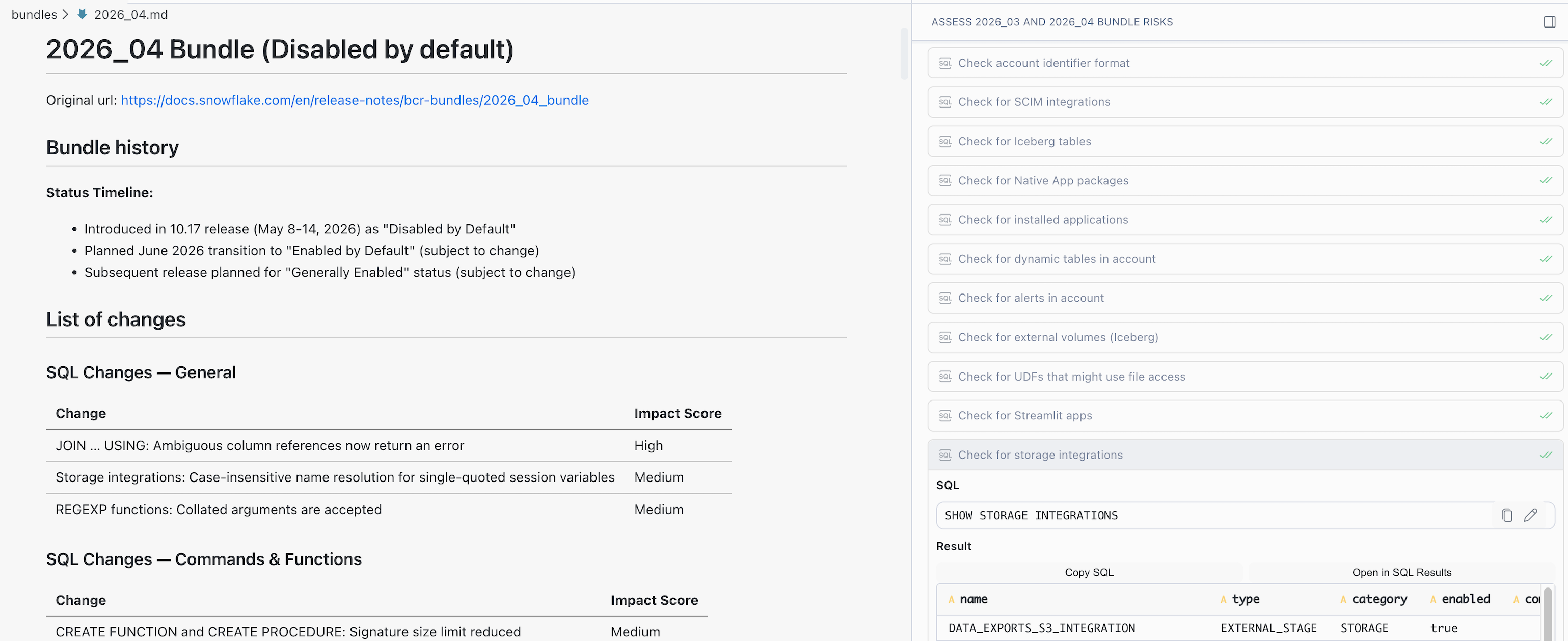
Throughout the investigation, Cortex Code Desktop showed these side by side:
- pipeline code
- the behavior bundle details
- the specific change currently under review, along with the queries or files the investigation covered
Details and evaluation of the created risk assessment
The resulting risk assessment for the Snowflake 2026_04 Behavior Change Bundle evaluated which of the 14 upcoming behavior changes were most likely to affect our workloads, and how urgently each one needed attention before the bundle auto-enables.
Structure
The structure below shows how the assessment was organized, from the high-level summary through the detailed analysis and into the concrete follow-up actions.
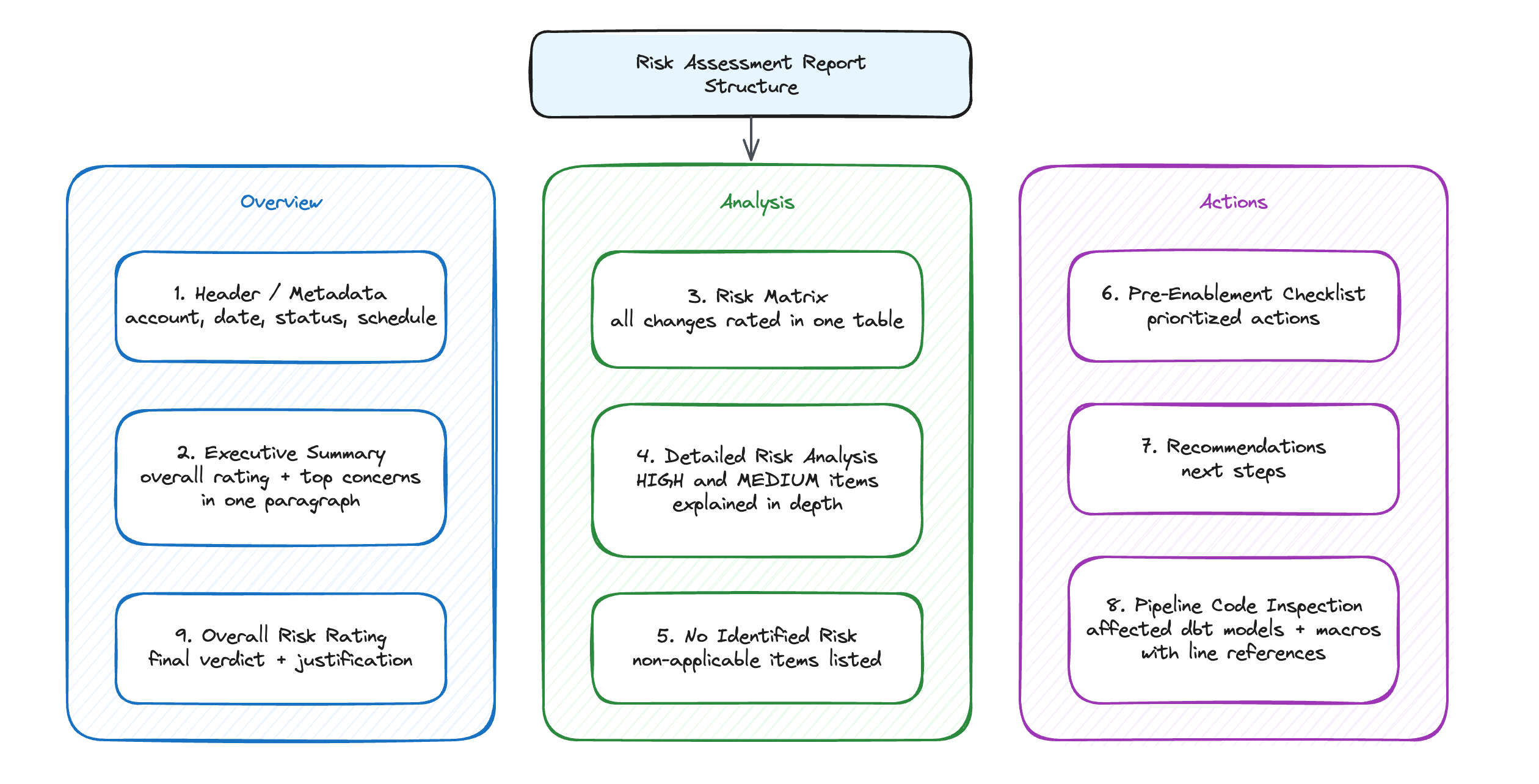
The document followed this layout:
- Header/Metadata — Account, date, bundle status, schedule
- Executive Summary — Overall rating (MEDIUM) and top 3 concerns in one paragraph
- Risk Matrix — A table rating all 14 changes with columns for the BCR number, Snowflake’s impact score, our account-specific risk level, and rationale grounded in query counts and infrastructure inventory
- Detailed Risk Analysis — Deep-dives on the items rated HIGH or MEDIUM:
- JOIN USING ambiguity (HIGH) — the most likely source of hard query failures in our pipeline
- CREATE OR ALTER FUNCTION property reset (MEDIUM) — possible CI/CD behavior drift
- UDF filepath handling (LOW/MONITOR) — potential file-not-found errors
- Storage integration case resolution (LOW, likely positive)
- UPPER/INITCAP byteLength (LOW)
- Items with No Identified Risk — Table listing 8 changes that did not appear relevant in our environment (no Iceberg, no dynamic tables, no alerts, no pipes, and so on)
- Pre-Enablement Checklist — Prioritized action items (Critical/Important/Recommended/Low priority)
- Recommendations — 4 actionable next steps
- Pipeline code inspection — A list of the affected dbt models and macros with references to the relevant code lines
- Overall Risk Rating — Final verdict with justification
How I evaluated the output
The assessment was useful, but I did not read it as something to accept blindly.
The overall MEDIUM rating felt right to me, and I agreed with treating the JOIN ... USING change as the highest-risk item for our pipeline. That was the kind of change that could turn into real dbt failures, not just a theoretical compatibility concern.
Where the output needed caution was runtime context.
The agent could inspect the repository, Snowflake query history, and the bundle notes, but it could not fully know which code paths actually run in production, how Airflow schedules interact with them, or which environment-specific settings matter. That still required someone who knows the pipeline.
The agent proposed next steps were useful, but mixed.
The strongest ones pointed to concrete models, macros, or deployment paths.
The weaker ones were closer to generic advice: monitor this, validate that.
The candidate fixes were best when the change was local and mechanical. For something like an ambiguous JOIN ... USING, I can imagine letting the agent create a candidate PR next time, then running dbt tests before a human review.
The useful part was not only the final output. The intermediate investigation also mattered: seeing which change was being checked, which query was run to verify the current account state, and how the query result affected the risk rating. That made the assessment easier to trust because the reasoning was tied to data, not just a written conclusion.
What we could do next
In this case, we stopped using the agent once the risk assessment was complete. We reviewed the findings and then applied the fixes manually as a team.
That boundary mattered. In a pipeline this complex, generating candidate fixes is useful, but deciding which changes are actually safe still requires human judgment.
The next step would be to automate more of that path in a controlled way: let the agent create candidate PRs for the narrow, mechanical fixes, deploy those changes to a development environment, and trigger the relevant dbt or Airflow validation before a human reviews the result.
That is the boundary I would be comfortable exploring next. Not automatic production changes, but faster movement from risk assessment to testable candidate fixes.